Technology
A Smart Home is no longer a distant future from sci-fi movies, but a standard of modern architecture and interior design. Whether you are building a new house from the ground up or renovating an existing apartment, the integration of smart technologies brings not only luxury, but also significant savings, comfort, and security.
In this comprehensive guide, we will walk you through everything you need to know about smart homes: from basic concepts, through the technologies we use in our projects (such as Home Assistant and Shelly relays), to advanced integrations with the Apple ecosystem.
What exactly can a smart home do?
Many equate a smart home with buying a single smart bulb that they turn on via their phone. A true Smart Home is much more than that — it is an invisible assistant that works for you, without you ever having to pick up your phone.
- Smart lighting and ambiances: Lighting automatically adjusts to the time of day (circadian rhythm). Lights turn on at 20% brightness at night when you head to the bathroom, and with a single click you transition from "Work" to "Movie" ambiance.
- Climate control and heating: The system recognizes when someone is home, turns off the AC if a window is open for more than 5 minutes, and optimally utilizes cheap electricity.
- Blinds and curtains: Blinds automatically lower when the sun hits the glass in the summer (to reduce overheating) or rise with the sunrise to wake you up naturally.
- Security and surveillance: Integration of cameras, motion sensors, and window opening sensors. If the system detects a water leak in the bathroom, it automatically closes the main valve and sends you a notification.
- Multimedia: Automatically muting the music when someone rings your doorbell, or playing your favorite Spotify playlist as soon as you open the door after work.
Pros and cons of smart homes
Like any technology, a Smart Home has two sides to the coin.
Pros:
- Ultimate comfort: Routine tasks are performed automatically. The house "breathes" with you.
- Energy efficiency: Smart thermostats and relays are proven to reduce electricity and heating bills by turning off appliances when they are not needed.
- Security: A sense of safety with smart locks, alarms, and presence simulation that turns lights on and off while you are on vacation, making it look like someone is home.
- Increased property value: Apartments and houses with integrated smart systems have a higher market value.
Cons:
- Initial investment: Quality modules and sensors require a certain budget.
- Setup complexity: To make everything work like clockwork, advanced automation programming is required.
- Reliance on the network: If you have a poor Wi-Fi router, you will also have a poor experience with your smart home (which is why we always insist on a premium network infrastructure).
Our approach: Home Assistant as the brain of the operation
There are hundreds of applications on the market — Tuya, Xiaomi Home, Samsung SmartThings. However, we always rely on Home Assistant (HA). Why? Because we do not want our clients' homes to depend on Chinese servers or cloud services that might be shut down tomorrow.
Home Assistant is the most powerful open-source platform in the world that runs locally. All operations happen within your home. Even if your internet goes down, your switches and automations will continue to work flawlessly. Additionally, Home Assistant can connect over 2000 different brands into one beautiful, unified application.
Beautiful user interface (Dashboard)
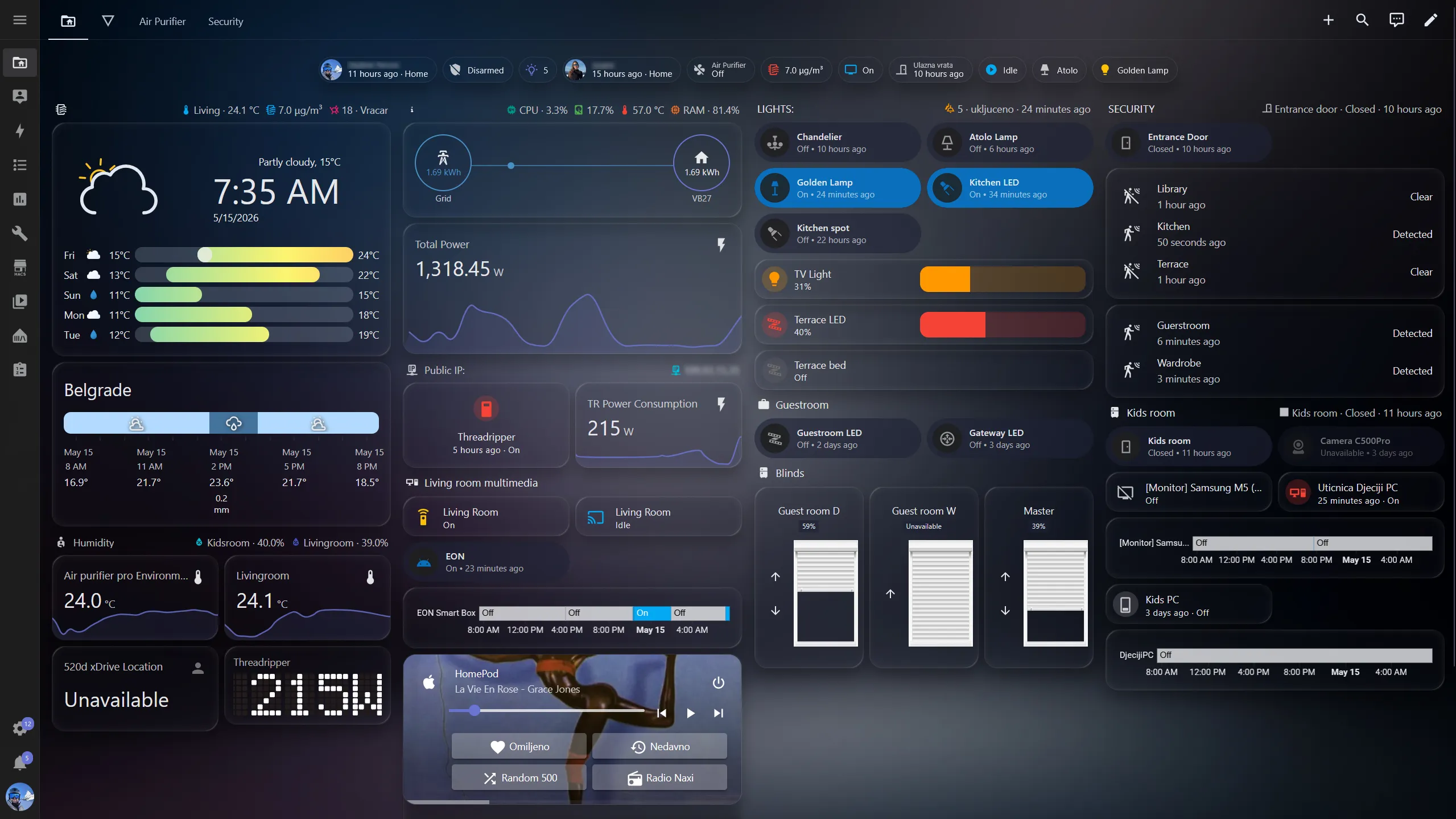
One of the biggest advantages of Home Assistant is the ability to create custom dashboards. We design interfaces for our clients that perfectly blend with the interior aesthetics, often displayed on iPads integrated into the wall.
*(Example of a premium dark-mode interface with an apartment floor plan, lighting control, and surveillance).*
Server infrastructure: Proxmox and stability
For Home Assistant to be absolutely reliable, it needs to "run" somewhere. We avoid cheap solutions like Raspberry Pi devices, which often corrupt SD cards.
Our standard is Proxmox VE (Virtual Environment) installed on a dedicated Mini PC (e.g., Intel N100, 8GB RAM, fast NVMe SSD). Home Assistant OS is installed as an isolated virtual machine (VM). This provides:
- Speed and stability: The system reacts in milliseconds. There is no delay when you press a wall switch.
- Backups (Snapshots): Proxmox allows us to take a snapshot of the entire system. If something breaks, we can revert the system to its previous state in 30 seconds.
Despite running 24/7, this hardware has a remarkably small energy footprint. In idle state — which accounts for most of its operating time — the Intel N100 platform draws only 6–8W. That translates to approximately 60–70 kWh per year, roughly the same as a single old 100W incandescent bulb left on for just two hours a day. The enclosure uses fully passive cooling: no fan, no moving parts, completely silent — ideal for placement next to a fuse box or inside a utility room.
Remote access without compromise: Cloudflare Tunnels
Previously, people used DynDNS services and opened ports on their routers to access their home network remotely. This is a massive security risk.
Today, we use Cloudflare Tunnels. Your local server creates a secure outbound tunnel to Cloudflare, allowing you to access your application anywhere in the world without opening any ports (Port Forwarding) on your router, keeping your network safe from hackers.
Actuators: Why we choose Shelly relays?
When it comes to installation behind the switches, our number one recommendation is always the Bulgarian brand Shelly. The reason is simple: these devices are incredibly miniature, operate over Wi-Fi, and most importantly — support full local control (MQTT/CoAP) without the obligation to use their cloud.
Here is what is most commonly used:
- Shelly 1 Mini Gen3 / Plus 1PM: Basic relays for turning regular lights, water heaters, or sockets on and off, with an option for energy consumption measurement (PM modules).
- Shelly Dimmer 2: The brain for your dimmable lighting. It enables that cinematic, slow turning on and off of lights.
- Shelly Plus 2PM: A module specialized for controlling blinds, curtains, and awnings. It features calibration so you can tell it to "lower the blinds to exactly 43%".
- Shelly RGBW2: For ultimate control of LED strips (colors and white light warmth) in coves and kitchens.
Shelly modules are connected "behind" your classic wall switches. This means you still have a normal click on the wall (you are not forced to use your phone), while the house remembers and reacts!
Sensors: The eyes and ears of a smart home
Sensors are what truly makes a house "smart" because they allow automations to know what is happening. A basic list of sensors we implement includes:
- Contact Sensors (Doors/Windows): Magnetic sensors that monitor the state of the joinery. If you open a window, the air conditioner automatically turns off to save energy.
- Temperature and Humidity Sensors: Distributed across rooms to optimize heating/cooling for each zone individually.
- Illuminance Sensors (Lux): They monitor natural light levels and turn on the lights only when it gets truly dark.
Presence vs. Motion (PIR)
One of the biggest frustrations with older smart homes were PIR motion sensors. You sit down to read a book or watch a movie on the sofa, you don't move much, and the lights turn off in the middle of the movie. You have to wave your hand to turn them back on.
That is why, in modern installations, we are transitioning to mmWave Presence sensors (radar sensors). These sensors use technology similar to that found in autonomous vehicles. They detect presence based on micro-movements – even human breathing! The light in the bathroom or living room will stay on exactly as long as someone is in the room.
Smart Locks: Nuki Smart Lock
Keys are becoming a thing of the past. We often integrate the Nuki Smart Lock into our projects. Nuki is mounted on the inside of the door over the existing cylinder. When you approach the door with your phone in your pocket, the lock automatically unlocks (Auto-Unlock function). Also, you can remotely unlock the door for guests or handymen, and the system perfectly integrates with the Home Assistant alarm – as soon as the door locks, the alarm is automatically armed.
Safety, Floods, and Gas
Besides protection against burglary, a smart home protects you from disasters that can destroy your valuable interior. If a sensor detects water under the washing machine, a smart valve on the main pipe automatically shuts off the water in the entire apartment in less than 3 seconds and sends you an urgent notification on your phone.
| Hazard Sensor Type | Operating Principle | Smart Home Reaction |
|---|---|---|
| Water Leak Sensor (Flood) | Placed under the sink, water heater, and washing machine. | Automatically closes the motorized water valve. Prevents thousands of euros in damages. |
| Gas / Carbon Monoxide Sensor | Placed in kitchens with gas or boiler rooms. | Triggers an audible siren, sends a notification, and automatically turns off all potential sources of sparks. |
| Smoke Sensor (Fire) | Photoelectric sensor on the ceiling. | Turns all lights on to 100% (for easier evacuation), raises the blinds, and turns off ventilation systems that could spread the fire. |
Climate control and air quality
Air Conditioning Control:
You no longer have to look for the AC remote. Whether you have classic split systems (which we integrate via infrared smart controllers like Sensibo or Broadlink) or advanced multi-split and VRV/VRF systems with heat pumps, all heating and cooling is centralized in Home Assistant. Before leaving work, you turn on the AC with a single click, and the system smartly turns off the devices if someone opens a balcony door.
Air Purifiers:
In the winter, when the level of PM2.5 particles is high, the smart home independently takes care of your lungs. As soon as outdoor or indoor sensors detect pollution (or when cooking begins), smart air purifiers (e.g., Xiaomi Air Purifier, integrated into the system) automatically turn on at maximum speed. Once the air is cleaned, the system returns them to the silent "Auto" or "Sleep" mode, ensuring you always breathe clean air without your manual intervention.
Integration: Apple Ecosystem and HomePod Mini
For clients who use iPhone devices, the story is just getting started here. Although Home Assistant is the main brain, we "export" the entire system into Apple HomeKit.
What does this mean in practice?
All your lights, ACs, blinds, and sensors automatically appear in the "Home" application on your iPhone and Apple Watch.
We place small, beautiful speakers – Apple HomePod Mini – in the living room and bedrooms.
Now your house understands speech. You can simply say:
- "Hey Siri, I'm home!" (Welcome lighting turns on, blinds go up)
- "Hey Siri, set living room to 20 percent." (Lights are dimmed)
- "Hey Siri, good night." (All lights in the entire apartment turn off, doors are locked, the AC turns off).
You don't even have to pick up your phone. Voice control, when executed stably, completely changes the way you experience your living space.
The protocol war: How do smart devices communicate?
For a smart home to function without interruption, devices must communicate with each other. They do not all use the same "language". Here is an overview of the most popular wireless protocols we encounter in practice, along with their pros and cons.
| Protocol | Description and Purpose | Pros | Cons |
|---|---|---|---|
| Wi-Fi | The most widespread standard. Devices connect directly to your router (e.g., Shelly). | Does not require an additional hub. High response speed and data throughput. | Consumes a lot of power (bad for battery-powered sensors). Can overload the home router if you have 50+ devices. |
| Zigbee | A mesh protocol designed specifically for smart homes (Philips Hue, Aqara). | Extremely low power consumption (batteries last for years). Every mains-powered device amplifies and extends the signal. | Requires a dedicated Hub/Gateway (or a Zigbee USB dongle for Home Assistant). |
| Z-Wave | Similar to Zigbee, but operates on a lower frequency (usually 868 MHz in Europe). | Excellent range and penetration through thick walls. Not interfered with by Wi-Fi (does not get congested on 2.4GHz). | Devices are significantly more expensive due to rigorous chip licensing. |
| Bluetooth (BLE) | Bluetooth Low Energy. Often used for smart locks or small sensors (SwitchBot). | Cheap to implement, easy direct connection with a smartphone. | Very short range. Easily loses connection if there is no Bluetooth proxy device nearby. |
| Matter / Thread | The latest global standard (supported by Apple, Google, and Amazon giants) designed to unify all systems. | All devices work on all platforms (no more "Only works with Apple HomeKit" restrictions). Local control by default. | The technology is still developing and the device offering is currently limited and relatively expensive. |
In practice, for our premium projects, we usually create a hybrid: we use stable Wi-Fi for the main relays (lighting and blinds) alongside powerful Ubiquiti routers, while using a Zigbee network for small battery-powered sensors.
Market analysis: What is available locally?
The device market is huge, and options range from cheap DIY solutions to professional systems.
- Shelly: The undisputed leader in price, quality, and ease of integration into serious systems.
- Sonoff: A slightly cheaper alternative to Shelly. Many of their devices use the Zigbee protocol (requires a separate router/dongle). Great for less demanding users.
- SwitchBot / Wyze: Excellent "gadget" devices. SwitchBot offers tiny robots that literally press old switches or automatically pull fabric curtains on rails.
- Tuya (Moes): A Chinese giant offering literally everything - from smart bulbs to sensors. Their downside is that they are often tied to the cloud, but with a bit of effort, they can be made to run locally.
Comparative table of basic module prices
| Device / Relay Type | Brand / Model | Purpose | Approximate Price |
|---|---|---|---|
| Basic Relay (1 channel) | Shelly Plus 1 | Lights, sockets | ~15€ - 18€ |
| Basic Relay (1 channel) | Sonoff Mini R4 | Lights, sockets | ~10€ - 12€ |
| Dimmer (Brightness control) | Shelly Dimmer 2 | Ambient lights | ~22€ - 25€ |
| Roller Shutter Relay | Shelly Plus 2PM | Blinds, curtains, awnings | ~24€ - 27€ |
| Roller Shutter Relay | Sonoff DualR3 | Blinds | ~18€ - 20€ |
| LED RGBW Controller | Shelly RGBW2 | Cove lighting, LED strips | ~23€ - 26€ |
*(Note: Prices are approximate and apply only to modules, excluding installation and programming).*
How do they do it globally? Premium and High-End solutions
When it comes to villas with multi-million euro budgets across Europe and America, they rarely rely on Wi-Fi relays. Wired systems dominate there.
- KNX Standard: The absolute ruler in Europe. This is not a brand; it is an industry standard. All switches communicate via a special green KNX cable. The system is so stable that it is installed in hospitals and airports. KNX switches, made of glass or aluminum (e.g., brands like Basalte or Gira), can cost over 500€ per piece.
- Lutron: An American premium giant. Their lighting and motorized blinds system is considered the "Holy Grail" of reliability and luxury.
- Control4 / Savant / Crestron: You won't find these platforms in a retail store. They are custom-installed and control massive mansions with home theaters worth tens of thousands of euros.
Such wired, premium systems for an average house range from 15,000€ to well over 50,000€+ depending on complexity.
In comparison, a combination of high-quality network cables (Ubiquiti network), Home Assistant, and Shelly relays provides you with 90% of the capabilities of premium systems, but for a drastically smaller budget, often between 1,000€ and 3,000€ depending on the property size and number of sensors.
Conclusion
A smart home does not mean a complicated home. A well-designed Smart Home behaves naturally — it does not require you to constantly hold your phone in your hand, but rather enhances your daily life so that you don't even have to think about it.
Investing in a reliable foundation (Proxmox + Home Assistant) and quality actuators (Shelly) will provide you with a home that breathes with you, one that is secure and incredibly comfortable. If you are considering installing such a system in your new space, the most important thing is planning before the cables even go through the walls. We are ready to help you in that process!