Technology
Project management in architecture, construction, and interior renovation has always been a challenging and highly complex discipline. Unlike software development, where iterations are rapid and mistakes are virtual, in our industry, every planning error translates to lost hours on the construction site, missed deadlines, and most importantly, thousands of euros in unforeseen expenses. In this extensive blog post, we want to share our journey — from chaotic beginnings, through commercial tools and open-source solutions, to the moment we finally decided to develop our own industry-specific platform: renovationsteps.com.
How Others Do It (And Why It Often Fails)
When we look at how the average interior design bureau or construction firm manages its projects, the picture is often discouraging. Communication is fragmented: photos of tiles are sent to clients via Viber or WhatsApp groups, official agreements are confirmed through emails that get lost in crowded inboxes, and schedules and budgets are tracked in static, convoluted Excel spreadsheets that only one person in the company truly understands.
When such companies finally decide to transition to specialized Project Management (PM) software, they usually reach for the most popular commercial solutions like Asana, Monday.com, Trello, or Notion. While these tools are visually appealing and incredibly powerful, they introduce three major problems for our specific industry:
- The Generic Approach: These tools are built to be "everything for everyone." From marketing agencies to legal teams, everyone is supposed to use them. Because of this, they do not follow the natural flow of an architectural or construction project out of the box. There are no built-in phases like "Demolition," "Installations," or "Rough Works"; you are left entirely on your own to build a system from scratch.
- Per-Seat Pricing: On a construction site, you have dozens of subcontractors — electricians, plumbers, carpenters. If you have to pay a monthly license of 15-20 euros for each of them just so they can check off a single task on their phone, software costs quickly become astronomical.
- Data Privacy Concerns: Your blueprints, contracts, client financials, and private information reside on servers usually located in the US. For high-end clients who demand absolute discretion, this is often unacceptable.
Our Previous Attempt: Plane
Aware of these limitations, our first major step was shifting to an open-source approach. The first tool we successfully implemented was Plane. It is a beautifully designed, exceptionally fast software positioned as an open-source alternative to Jira.
Plane allowed us to organize workspaces, track cycles, and generate powerful reports. However, we quickly hit an insurmountable obstacle. Plane is designed strictly from a software engineering perspective. Its architecture is based heavily on "Sprints" (two-week cycles typical for developers) and "Issues" (code bugs). Architecture does not need a "Sprint," it needs a "Phase," and on a construction site, we do not resolve "Issues," we track "Tasks" and material deliveries. Although beautiful, Plane simply spoke a language that our craftsmen and clients did not understand.
The Shift to Vikunja (Hosted via Docker)
After Plane, we discovered Vikunja (Vikunja.io) — an outstanding, lightweight, and powerful to-do and PM system that is more oriented toward task management, Kanban boards, and Gantt charts, completely unburdened by software development terminology.
We decided to self-host it "in-house" to maintain 100% control over our data. Our infrastructure relied on a local office server (a Mini PC), Docker, Caddy server, and Dynamic DNS.
Technical Details: Docker, Caddy, DynDNS, and HTTPS
Setting up your own server requires careful planning. Using Docker, the installation of Vikunja was reduced to writing a simple docker-compose.yml file that defined the database (MariaDB), Redis (for caching), and the Vikunja application itself (frontend and backend in one container). Containerization meant the app was completely isolated from the operating system and would always behave exactly the same way, regardless of hardware.
However, because we hosted the application on an office network with a dynamic IP address (meaning the internet provider changes the IP address every 24 hours), we had to configure DynDNS (Dynamic DNS). Utilizing Cloudflare and a simple Dockerized script, our server would ping Cloudflare every minute with its current IP address, ensuring our custom domain (e.g., pm.our-firm.com) always routed to the correct server in the office.
The biggest challenge with self-hosting is always security and SSL certificates (HTTPS). This is where Caddy comes into play. Instead of complicated Nginx or Apache setups, Caddy is a modern reverse proxy web server written in Go that automatically fetches, renews, and installs Let's Encrypt SSL certificates seamlessly. The configuration literally required just three lines of code in the Caddyfile:
pm.our-firm.com {
    reverse_proxy vikunja:3456
}
Caddy would automatically intercept all incoming traffic from the external internet, encrypt it securely, and forward it to our local Docker container running Vikunja. This system provided us with enterprise-level functionality for exactly 0 euros a month.
The Epiphany: Why Generic Tools Are Never Enough
The system running Vikunja worked flawlessly on a technical level. However, after a few months of usage, we noticed the exact same workflow problem as with commercial solutions. We constantly had to explain to every new client and every new subcontractor how we organized the project in the software. We had to manually create dozens of lists and tags for every renovation phase, every single time.
Asking ourselves: "Why do architects and builders constantly adapt our businesses to fit generic tools, instead of having a tool designed specifically for us?", we arrived at the only logical conclusion.
The Birth of renovationsteps.com
We decided to aggregate all 20 years of our experience in architectural design and site management and translate it directly into software. Thus, renovationsteps.com – Smart Planning System was born.
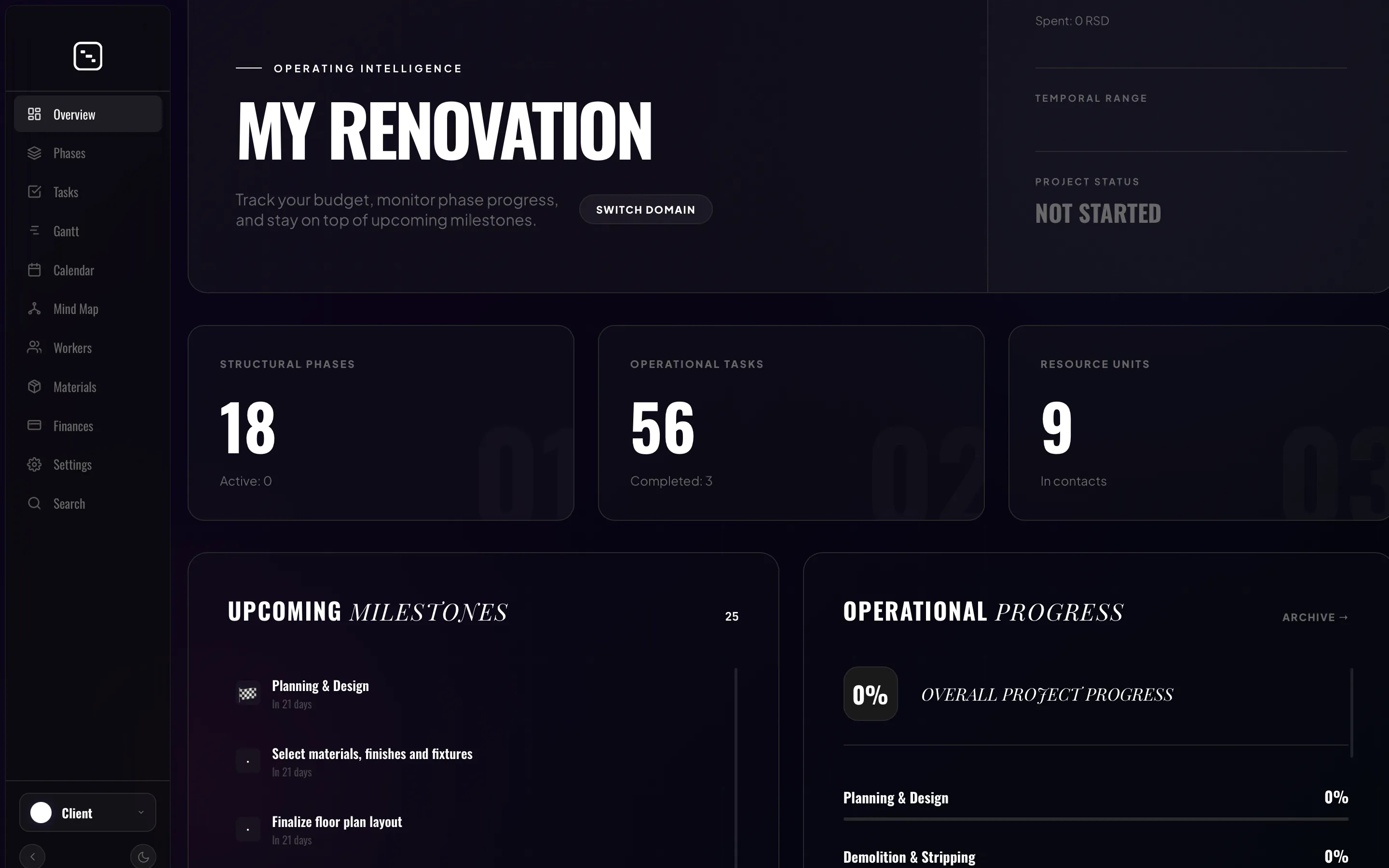
This is no longer just another to-do app. This is a highly specialized platform with a strict, built-in methodology. We abandoned the idea of "infinite flexibility," which usually just confuses users. Instead, renovationsteps.com forces the project to move through our proven model of 10 precise renovation phases (from initial planning and permits, through demolition, rough installations, fine finishes, all the way to handover and move-in).
Key Features That Make the Difference
While developing the platform, we identified the most common problems on a construction site and created specific modules to solve them:
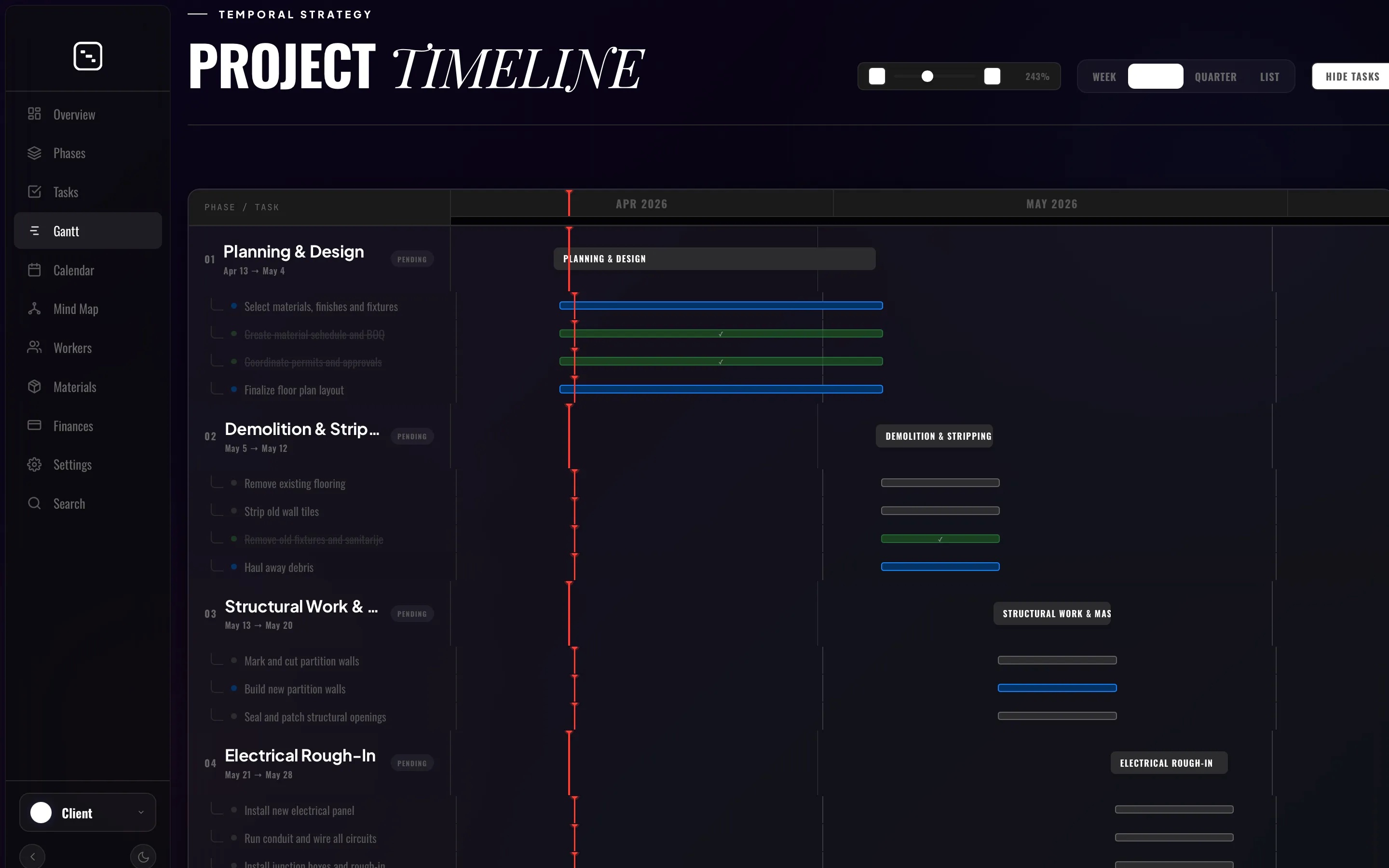
1. Construction-Optimized Gantt Chart
Linear planning is crucial. Our Gantt view is not just a visual cross-section; it is a highly interactive tool where task dependencies actually make sense (e.g., the tiler cannot start until the waterproofing is fully complete, and waterproofing cannot start until the plumbing is finished). Shifting a single delayed task automatically and dynamically pushes all dependent deadlines forward.
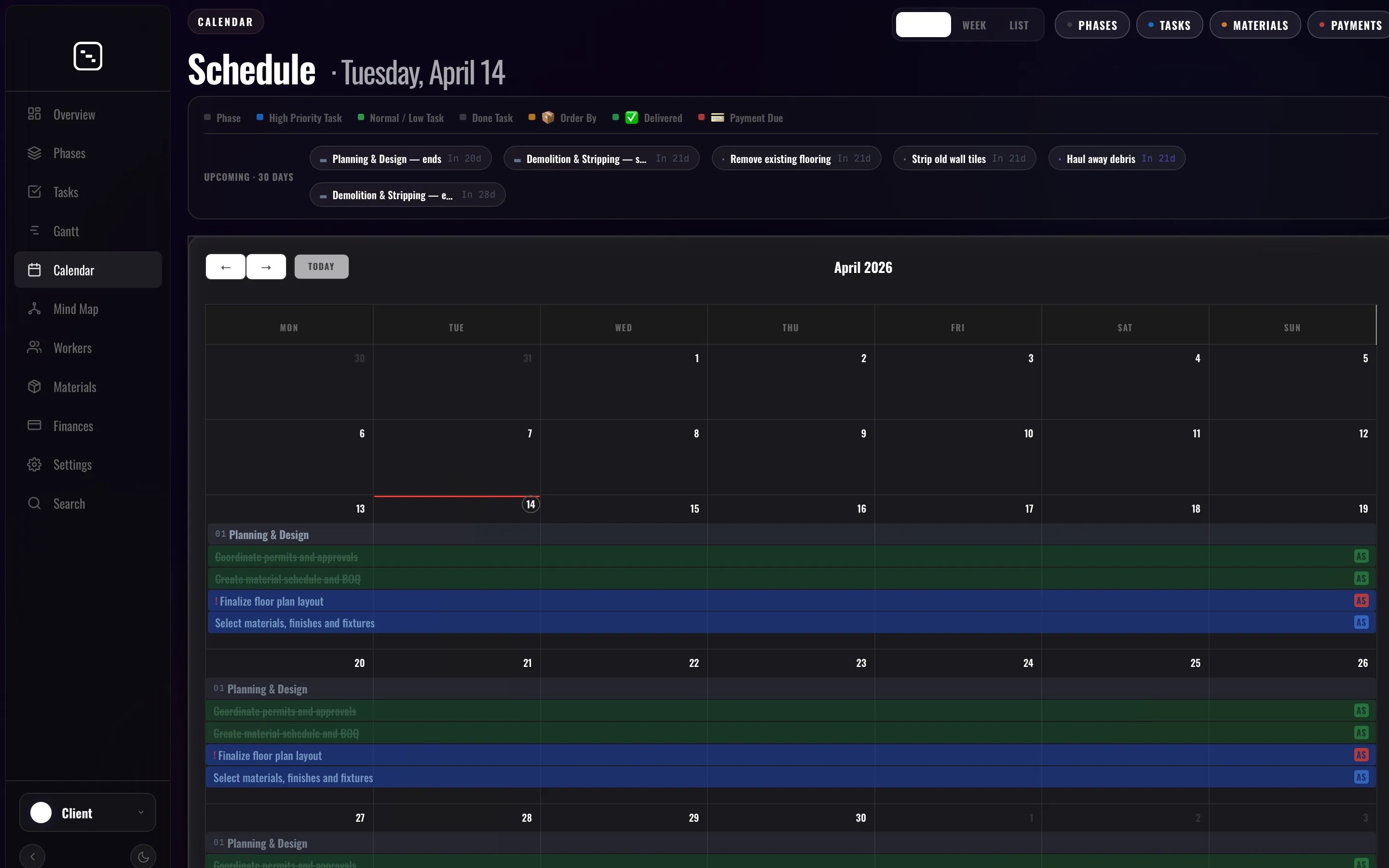
2. Calendar View & Resource Management
Unlike software development teams who sit at the same desk every day, our teams (craftsmen) constantly change physical locations. The Calendar view allows central management to know in a single visual second whether the painting crew is at the "Zemun" project on Tuesday, while the electricians are deployed in "Dorćol."
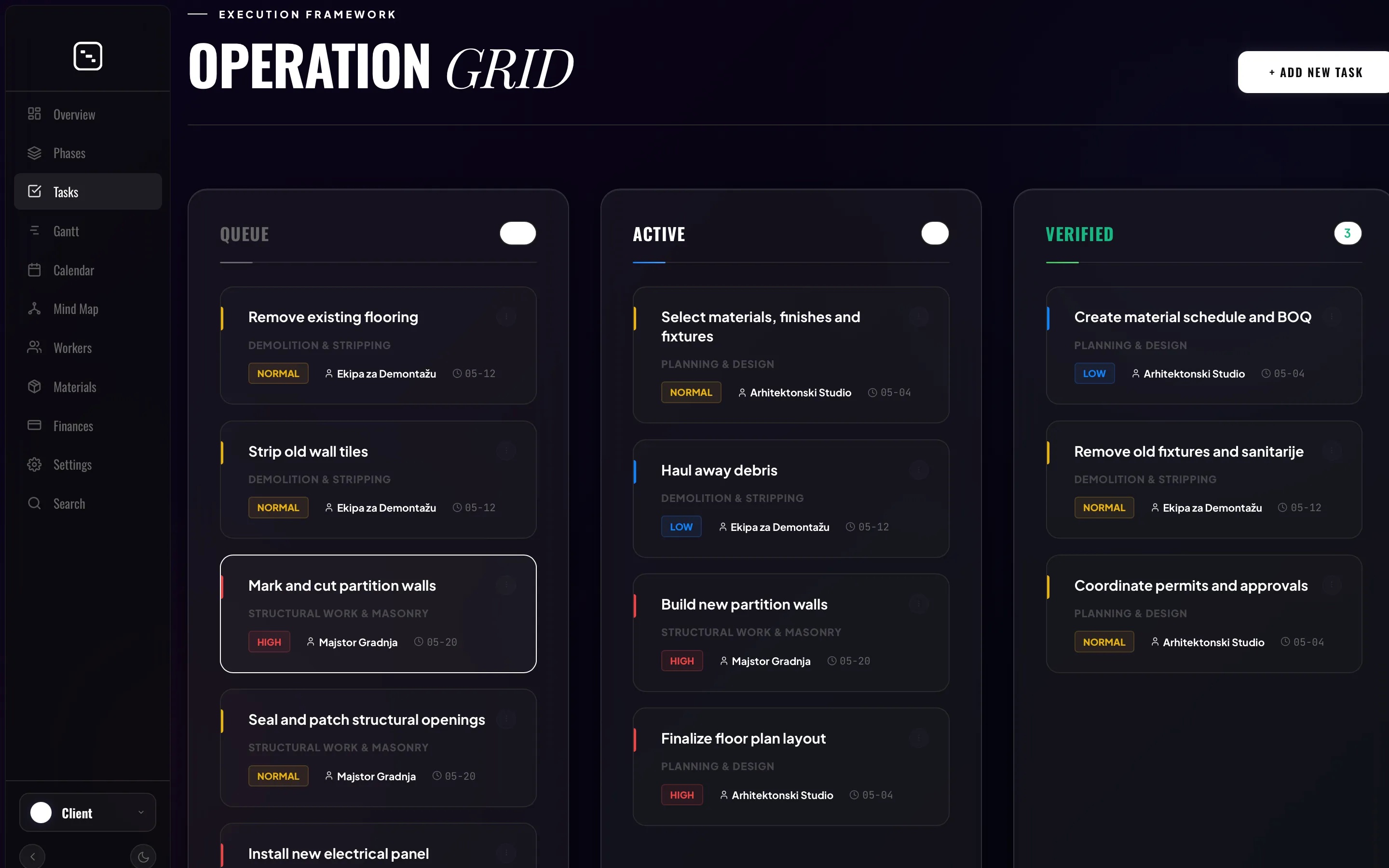
3. Phase-Based Tasks & Kanban
Tasks in renovationsteps.com are never just "floating" and lost in chaos. Every task, from ordering a specific water valve to installing a decorative baseboard, is strictly tied to one of the 10 project phases. This structured Kanban system ensures that communication happens directly on the task itself — if the tiler has a question, they leave a photo and a comment right there, not in a private Viber message to the manager.
4. Strict Hierarchy and Roles
We implemented a multi-tiered access system. The Architect (Project Manager) has full access to budgets and deadlines. The Client is provided a "Guest View" where they can track progress transparently in real-time (drastically reducing the need to call the office 5 times a day to ask "how are we doing?"). Subcontractors see only the specific tasks assigned directly to them.
A New Era: Coding and Development with Artificial Intelligence (AI)
Developing a complete SaaS (Software as a Service) platform like this would have previously required hiring an entire team of senior software engineers, months of grueling work, tens of thousands of euros in investment, and indescribable stress over squashing bugs. Today, however, the paradigm has completely shifted. Building and continuously adapting a complex application like renovationsteps.com is now drastically easier and faster with the help of advanced Artificial Intelligence (AI) agents, such as Claude Code and Google's Antigravity. These tools do not merely write isolated snippets of code; they possess deep contextual understanding of the entire project repository. When we need a new feature — for instance, integrating a specific expense tracking module with advanced data filters — we simply converse with the AI agent about the application's architecture. The agent then autonomously writes complex React components for the frontend, provisions API routes on the backend, updates database models, and executes package installations. This unprecedented symbiosis between our domain-specific architectural knowledge and the AI's ability to instantly compile that logic into flawless code has allowed us to develop, maintain, and endlessly refine renovationsteps.com at an unimaginable speed and quality. AI is no longer just an assistant; it is our primary co-founder in development.
Free to Use & Premium Templates
Best of all – the core platform is completely free to use for everyone. Whether you are an independent designer, a contractor, or a homeowner starting a renovation, you can create your account and start planning your project at no cost. For those who want to accelerate the process and avoid manually entering hundreds of construction tasks, we also offer a premium option: the ability to purchase ready-made, fully populated templates for the complete renovation of a studio, a two-bedroom, or a three-bedroom apartment. These templates contain all predefined tasks, typical contractor sequences, and critical dependencies, so you can hit the ground running instantly.
Conclusion: Moving from Tools to Systems
Transitioning from chaotic spreadsheets and generalized tools to a highly specific, industry-tailored system like renovationsteps.com is not just about saving time. It represents a fundamental leap in professional operational maturity. It reduces incredibly expensive errors caused by miscommunication, instills absolute trust in clients through process transparency, and finally allows architects and project managers to return to what they actually love doing — creating extraordinary spaces, rather than constantly administering chaos.
We invite you to visit our website, explore the platform, and see firsthand how smart planning can transform your next renovation project from a source of endless stress into a beautifully orchestrated journey.
Share:
renovationsteps.com