Technology
On an interior project, several things happen at once: a detail is being developed, a quotation arrives, a sample needs approval and a contractor needs a date. Our job is to connect that information and turn it into a clear next action. We use Project Kontrol, an internal tool we develop around the way our studio designs and follows construction.
Tasks, schedules, quotations, payments, documents and the project journal live together. We start from the same overview when preparing for a meeting or checking what the next phase needs.
The illustrations are cropped interface screenshots from a generic “Renovation Steps” demo. All tasks, dates and amounts are illustrative, not client project data or renovation quotations. Clicking an image opens only the larger screenshot.
From Renovation Steps to daily practice
Our earlier article on developing Renovation Steps discussed why a tool should follow the logic of renovation. Here we focus on how we use Project Kontrol during a working day, from planning and decisions to recording completed work.
We first give a project structure. Its phases reflect the scope of work, and each phase contains concrete tasks: prepare a drawing, check a detail, collect quotations, approve a sample or inspect completed work. Dates, notes and smaller steps stay with each task.
The morning overview: where a decision is needed
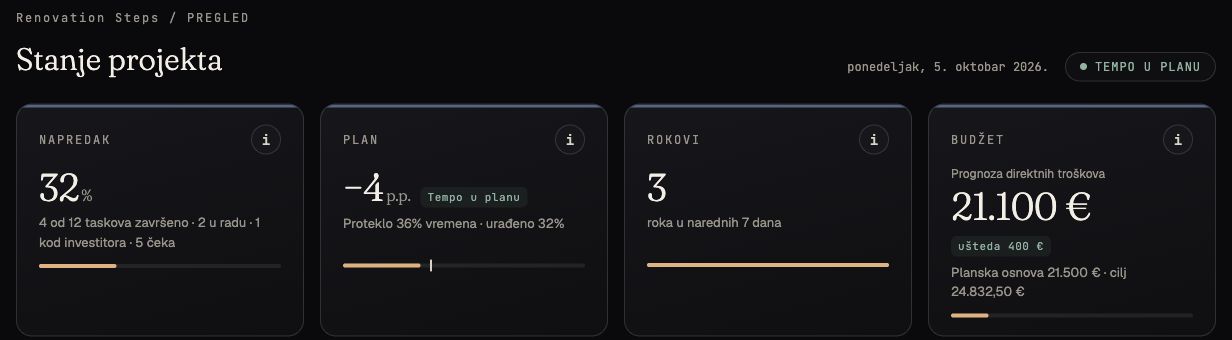
The opening view brings together progress, approaching deadlines and the budget. We pay particular attention to items that need action: an overdue task, a client decision or an unresolved next step recorded in the journal.
This gives a meeting a specific starting point. If a tile sample needs approval this week, we check whether it has been reviewed, what remains unclear and who needs to respond. The decision becomes a visible project obligation.
Tasks: a clear status for each obligation
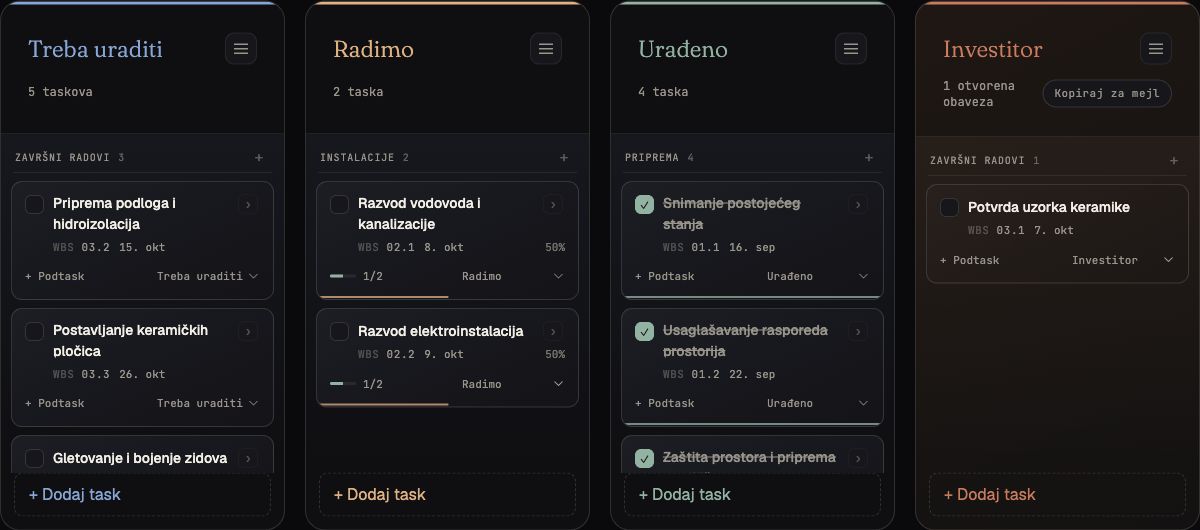
The board separates tasks into To do, In progress, Done and Client. The Client group holds pending decisions such as material approval, quotation selection or a proposed change. A status shows where the task stands; its notes explain what it needs to move forward.
Larger tasks contain subtasks. Preparing services might include checking routes, coordinating fixture positions and inspecting the installation before it is covered. Progress follows recorded completed steps, and we close the task once the work has been checked.
The Gantt chart: dates within the whole project
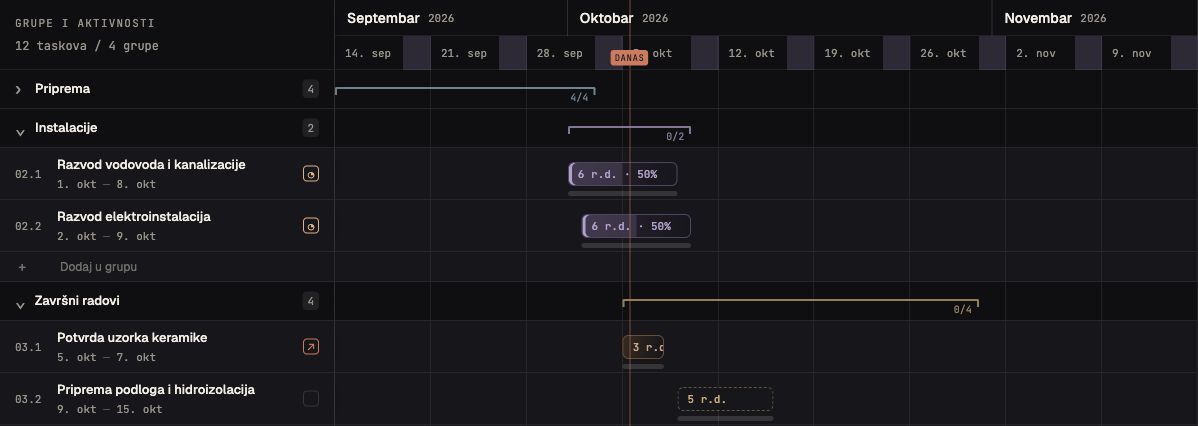
The Gantt view shows the sequence and overlap of project phases. Detail development, procurement and site work have different deadlines but affect each other. When a delivery date moves, we review the activities that depend on it and agree on a revised schedule.
A locked baseline preserves agreed dates for comparison. Alongside the current schedule, it helps us see what moved and by how much. The calendar offers a closer weekly view of meetings, activity starts and deadlines.
Super Search: find a decision or task
When we remember the subject but not the exact task title, we use the project's Super Search. It searches task titles and notes, subtasks, phases and WBS codes, as well as sources recorded with a task. It recognizes Latin and Cyrillic text, including searches typed without diacritics.
Quotation marks match an exact phrase; a minus excludes a word, as in doors -glass. We can narrow results by status, priority, phase, deadline, progress and subtasks, then sort them by relevance, deadline or other available criteria.
We can name and save a search to reopen the same group of obligations during a later review. The Ctrl + K shortcut takes us to the search field. That makes it quicker to find an earlier decision or a specific WBS item and pick up from there.
Costs: from estimate to confirmed payment
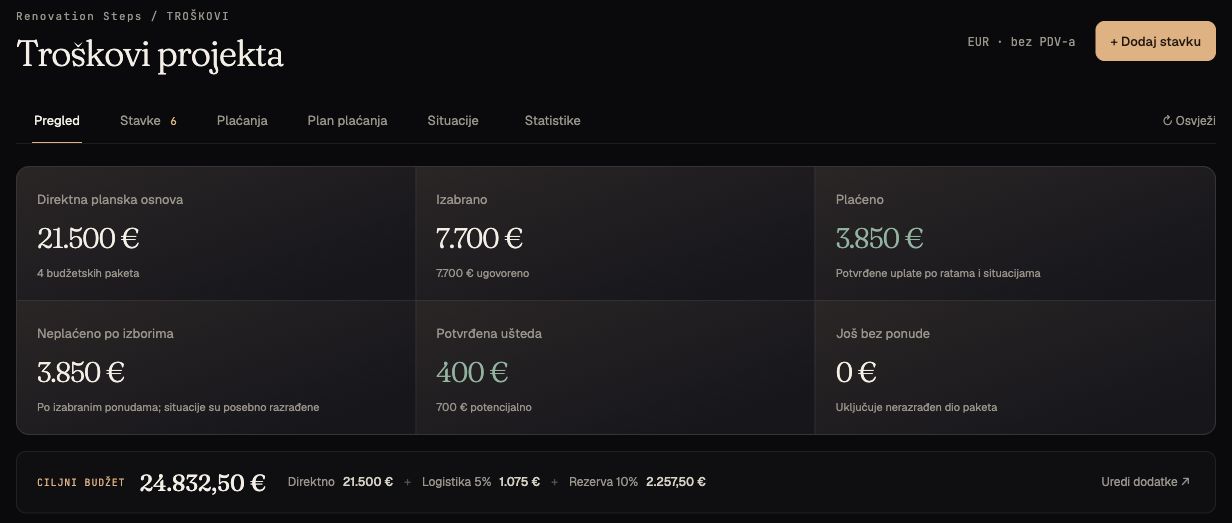
We track each cost item through distinct steps. The baseline is a planning estimate. Incoming quotations support comparison. We then record internal selection, client approval and contracting, and enter payments when they are confirmed.
These distinctions matter: a selected kitchen can still await approval, a contracted kitchen can be partly paid, and an advance payment does not mean installation is complete. Financial status and physical progress therefore remain separate.
The payment plan helps us anticipate when funds may be needed. We read its projections alongside contractual instalments and recorded payments. Amounts that belong to a planning scenario remain estimates to be checked against actual agreements and documentation.
Every item has a visible pricing basis
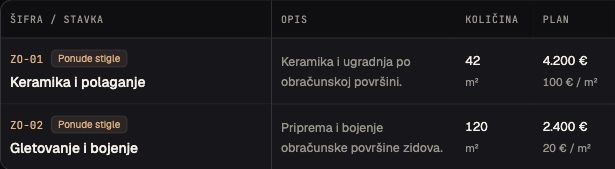
For each item, we keep its code and name, scope description, quantity, unit of measure and planned unit price. Depending on the work, the unit may be a square or linear metre, piece, set or lump sum. The planned total is calculated from quantity and unit price, so we can see what makes up the estimate and what to adjust if a measurement or rate changes.
The table shows both the total baseline and the rate per unit. Alongside these, it displays received quotations, the selected price and the difference from the baseline. We can compare the quotation's scope as well as its amount. Opening an item shows further details, including its description, alternatives, linked task and recorded payments.
The journal and documents: a retrievable agreement
After a site visit or meeting, we record the findings, outstanding decisions and next actions. An entry can link to a task and include photographs or documents. When an agreement develops, the record of its additions matters too.
We keep documents connected to their purpose. A quotation, drawing or meeting note is easier to use when it sits with the relevant task or cost item. Search and change history help us check an earlier agreement before the next conversation.
What the client gains
We can provide a protected, read-only view of the client's project. It gives our conversations a shared reference: completed work, next steps, pending decisions and contractual commitments. Access is agreed according to each participant's role.
We can also export a project overview to Excel for a meeting or archive. Internal working pages remain within the closed system; this article shows only selected interface details.
The tool depends on an up-to-date record
Project Kontrol is most useful when we record an agreement promptly, check statuses after a site visit and regularly compare the schedule with conditions on site. This takes discipline across the team. A progress percentage becomes useful when we know which work supports it.
That is how we connect design decisions with timing, procurement and execution. We want a clear answer to three questions: where are we, what is holding us up and what happens next?